Bluetooth Temperature Monitoring: BlueTag Cold Chain Guide
Bluetooth temperature monitoring is useful when teams need fast local access to environmental records without connecting a logger to a computer or opening a package, refrigerator, or controlled environment. Freshliance’s BlueTag series consists of Bluetooth temperature and temperature/humidity data loggers that can be used with the Tkeeper mobile app for local wireless data access and with GAEA gateways for automated cloud data transmission. Freshliance’s wider business covers the R&D, manufacturing, and sales of IoT temperature and humidity data loggers and online environmental monitoring systems.
Why Bluetooth Temperature Monitoring Fits Short-Distance Cold Chain Applications
Bluetooth Data Retrieval Without Opening Packages
Opening an insulated shipping container, pharmaceutical refrigerator, medical refrigerator, or incubator just to retrieve logger data can expose the monitored environment to ambient conditions. With a BlueTag device in Bluetooth range, staff can use Tkeeper on an Android or iOS phone to review current and historical data without physically accessing the logger.
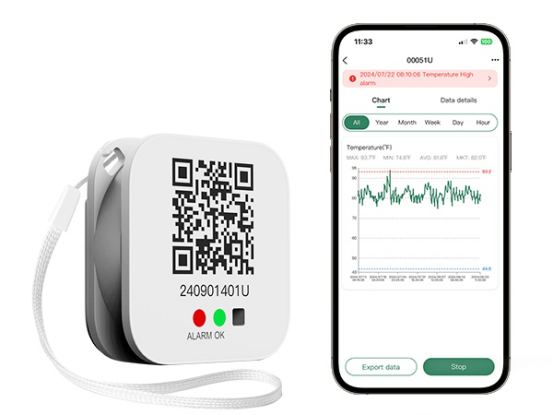
For example, BlueTag T10 Bluetooth Temperature Data Logger is a compact single-use Bluetooth temperature logger for cold-chain transport and storage. It measures from -30°C to +70°C with ±0.5°C full-scale accuracy, stores up to 65,000 readings, and exports PDF/CSV reports.
Local Wireless Review Before Cloud Upload
A standalone BlueTag logger is a Bluetooth data-logging device rather than a cellular or Wi-Fi-connected real-time monitoring device. A BlueTag logger records data locally and makes the stored data accessible when a compatible mobile device is within Bluetooth communication range. After data are read through Tkeeper, they can be synchronized to the Freshliance Cloud for sharing among authorized users. Tkeeper also supports graphs, filtering, Max./Min./Avg./MKT analysis, PDF/CSV export, electronic signatures, and email delivery.
Where continuous remote monitoring is required, compatible BlueTag devices can work with a gateway that collects nearby Bluetooth data and uploadsit to the cloud automatically.
BlueTag Series in Logistics Applications
Bluetooth Temperature Monitoring During Cold Chain Shipment Handover
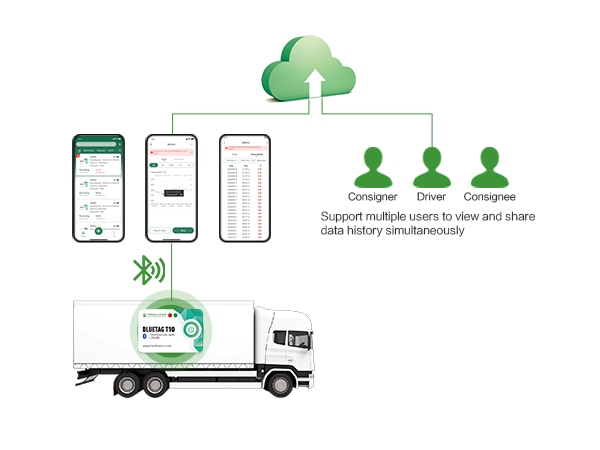
During shipment preparation, users can use the QR code to identify, add, or configure the BlueTag logger in Tkeeper. For standalone Bluetooth operation, users can retrieve recorded data when the logger is within Bluetooth communication range. The gateway automatically collects data from nearby BlueTag loggers within its coverage area and uploads it to the cloud.
This is useful when the logger is placed inside insulated shipping packaging, a refrigerated compartment, or a sealed container. Teams can check the record without opening the monitored environment, reducing unnecessary handling and minimizing unnecessary exposure to ambient conditions.
Cold Chain Shipment Records for Shippers, Carriers, and Consignees
BlueTag data can be synchronized through the cloud and shared with multiple users. At destination, a consignee can review historical data and export a PDF or CSV report, while synchronized information can also be available to other authorized stakeholders.
BlueTag T10 Bluetooth Temperature Data Logger is suited to single-use, temperature-only cold chain shipments. For reusable routes, BlueTag T100 Bluetooth Temperature and Humidity Data Logger or temperature-and-humidity BlueTag models can support repeated use.
BlueTag Series in Warehouse Monitoring
Temperature Monitoring for Small Warehouses and Cold Rooms
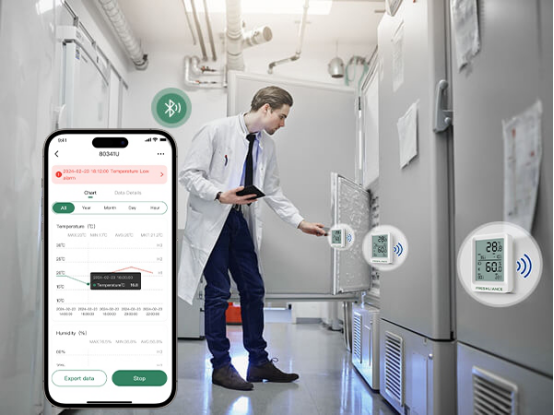
Bluetooth monitoring works well in small warehouses and cold rooms where staff can periodically come within Bluetooth communication range of the data loggers. BlueTag TH20 Bluetooth Temperature Humidity Data Logger records both temperature and humidity, includes an LCD screen, uses Bluetooth 5.2, stores up to 65,000 readings, supports PDF/CSV export, and has a replaceable battery.
For fixed or hard-to-reach points, BlueTag TH10R Bluetooth Temperature Humidity Data Logger and BlueTag TH30R Bluetooth Temperature and Humidity Data Logger support optional external probes, allowing the main unit to remain accessible while a probe is placed inside a refrigerator, cabinet, incubator, or other controlled space.
Gateway Upload for Automated Data Collection
Freshliance can combine selected BlueTag models with a GAEA gateway. GAEA G100 gateways support multiple nearby Bluetooth data loggers for automated data collection. The supported number of connected devices depends on the gateway configuration and application.When the network connection is interrupted, the BlueTag logger continues to record and store data, and re-uploads the stored data once the connection is restored.
BlueTag Series in Laboratory Environments
Refrigerators, Incubators, and Hard-to-Reach Spaces
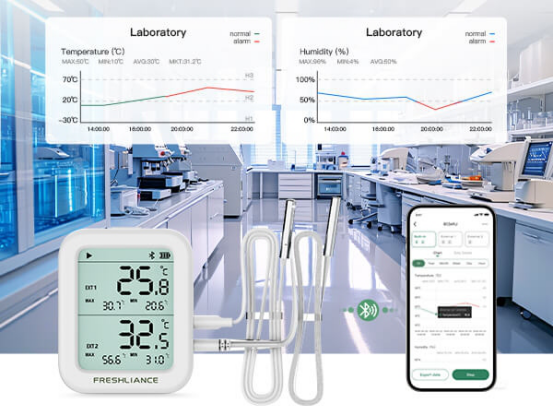
Laboratories often need to monitor refrigerators, incubators, storage cabinets, or enclosed spaces without repeatedly opening doors. BlueTag TH10R Bluetooth Temperature Humidity Data Logger and BlueTag TH30R Bluetooth Temperature and Humidity Data Logger are useful here because they combine Bluetooth access with optional external probes.
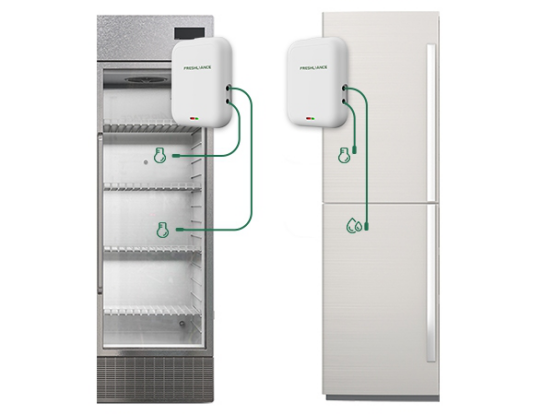
BlueTag TH10R Bluetooth Temperature Humidity Data Logger supports a built-in temperature and humidity sensor plus up to two external probes. Depending on the probe selected, the system can cover standard refrigerated conditions or specialized low- and high-temperature ranges. This allows laboratories to position the sensing element at the required measurement point while keeping the data logger accessible.
Multi-Point Temperature and Humidity Monitoring
With external probes, BlueTag TH30R Bluetooth Temperature and Humidity Data Logger can support up to three monitoring channels. Multi-point monitoring is useful when spatial temperature or humidity variability may make a single measurement point insufficient to characterize the monitored environment.
Choosing the Right BlueTag Setup
Model | Measurement | Use | Connectivity | Reusable | External Probe |
T10 | Temperature | Single-use cold chain | Bluetooth | No | No |
T100 | Temperature | Reusable monitoring | Bluetooth | Yes | No |
TH20 | Temperature + RH | Warehouse / laboratory | Bluetooth | Yes | No |
TH10R | Temperature + RH | External probe applications | Bluetooth | Yes | Yes |
TH30R | Temperature + RH | Multi-point monitoring | Bluetooth | Yes | Yes |
BlueTag T10 and T100 for Temperature-Only Monitoring
Choose BlueTag T10 Bluetooth Temperature Data Logger for single-use shipments where temperature is the only required parameter. Its 48 × 31 × 5 mm body, adhesive installation, 65,000-reading memory, and Bluetooth operation make it practical for shipment packaging.
Choose BlueTag T100 Bluetooth Temperature and Humidity Data Logger for reusable temperature monitoring. Its replaceable battery, compact design, ±0.3°C full-scale accuracy, and hanging or adhesive installation suit reusable medical kits, small containers, local logistics, and repeated monitoring tasks.
BlueTag TH Models for Temperature and Humidity
Choose BlueTag TH10 Bluetooth Temperature and Humidity Data Logger or BlueTag TH30 Bluetooth Temperature Humidity Data Logger when both temperature and relative humidity are required in a compact reusable device. Meanwhile, they are better suited for applications requiring external probes, difficult installation points, or multi-channel monitoring.
Conclusion
Bluetooth temperature monitoring is especially practical when users need short-range access to temperature or temperature-and-humidity records without opening controlled spaces. The Freshliance BlueTag Series supports logistics handovers, warehouse checks, cold rooms, refrigerators, incubators, and laboratories through Tkeeper-based wireless access. When remote visibility is required, compatible GAEA gateways extend the same sensing workflow into automated cloud monitoring.
For buyers planning a deployment, the key questions are whether monitoring is single-use or reusable, temperature-only or temperature-and-humidity, local Bluetooth monitoring or continuous remote monitoring, and whether external probes or multiple measurement points are required. The appropriate BlueTag model, gateway, software, and cloud configuration can then be selected according to the specific monitoring requirements and deployment environment.
FAQ
Q: Is a BlueTag logger the same as a USB temperature data logger?
A: No. The BlueTag series consists of Bluetooth temperature data loggers that transmit data wirelessly via Bluetooth, allowing users to view the data using the TKeeper app. Freshliance USB loggers are a separate product category that uses USB-based data export or computer workflows, depending on the model. The company distinguishes wireless Bluetooth, Wi-Fi, and 4G devices from traditional USB loggers.
Q: Do I need to scan the QR code every time I read a BlueTag device?
A: No. The QR code is used when adding or configuring the device in the app. Once added, users can approach the logger within Bluetooth range and use Tkeeper to read and synchronize data without rescanning it each time.
Q: Which BlueTag models support humidity monitoring?
A: BlueTag TH100, BlueTag TH20, BlueTag TH10R, and BlueTag TH30 series models support temperature and humidity monitoring. The model and probe configuration should be selected according to the required measurement range, number of monitoring points, and installation environment.
Previous: External Probe Temperature Logger for Cold Chain Monitoring
Next: How to Build a Real-Time Laboratory Monitoring System