IoT Temperature and Humidity Monitoring for Museums and Exhibitions
IoT temperature and humidity monitoring helps museums observe environmental conditions across exhibition halls, collection stores, preparation rooms, and other spaces instead of relying on isolated manual checks. A connected sensor network provides time-series environmental data across defined monitoring points, allowing staff to identify spatial and temporal variations in temperature and relative humidity. Freshliance supports this workflow with LoRa-based facility monitoring, local temperature and humidity logging, and software for reviewing the resulting records.
IoT monitoring does not establish a universal environmental setpoint for every collection. Instead, it provides continuous, location-specific data that museum teams can evaluate against collection-specific conservation requirements, environmental policies, and response procedures.
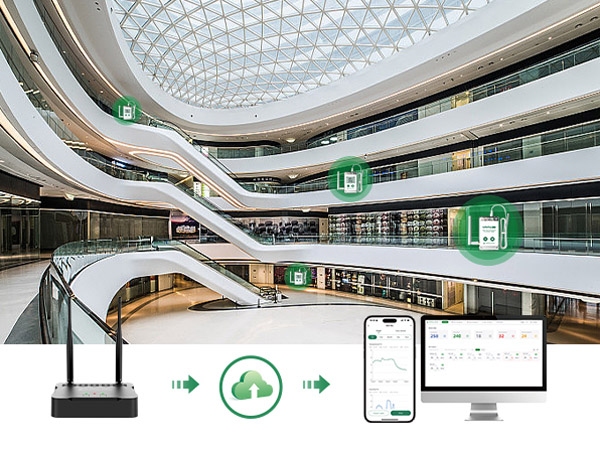
Why Museums Need Continuous Environmental Monitoring
Conditions Vary Across Exhibition and Storage Zones
Environmental conditions within a museum are rarely spatially uniform. Door opening, visitor occupancy, solar gain, lighting loads, display cases, shelving configuration, HVAC airflow, and localized heat sources can create spatial variations in temperature and relative humidity. A measurement taken near a control panel may not be representative of conditions at a display case or densely packed storage rack.
Museum environmental monitoring should therefore be planned by zone, with monitoring points selected according to the characteristics of each storage or exhibition area. Representative sensor points help staff see whether a change is building-wide or limited to one room, cabinet, or visitor route.
Manual Readings Miss Short-Term Fluctuations
Manual measurements provide point-in-time observations and may not capture transient environmental fluctuations between measurement intervals. Door opening, HVAC cycling, visitor occupancy, and temporary exhibition activities can introduce short-term temperature and RH fluctuations between measurement intervals. Continuous data logging creates a time-series record that can be reviewed to identify short-term fluctuations, recurring patterns, and environmental excursions.
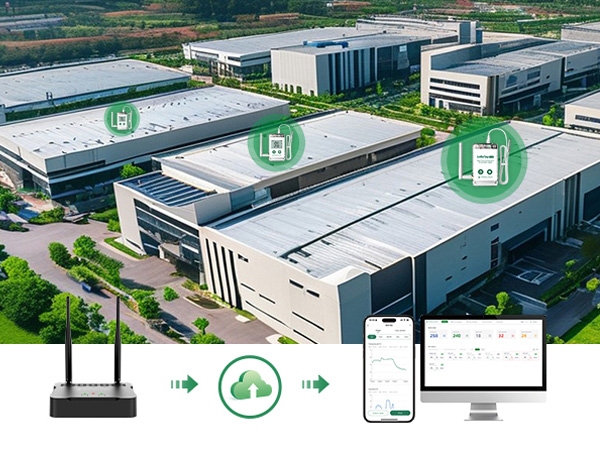
How IoT Monitoring Supports Museum Environmental Management
Multi-Point Monitoring for Galleries and Collection Rooms
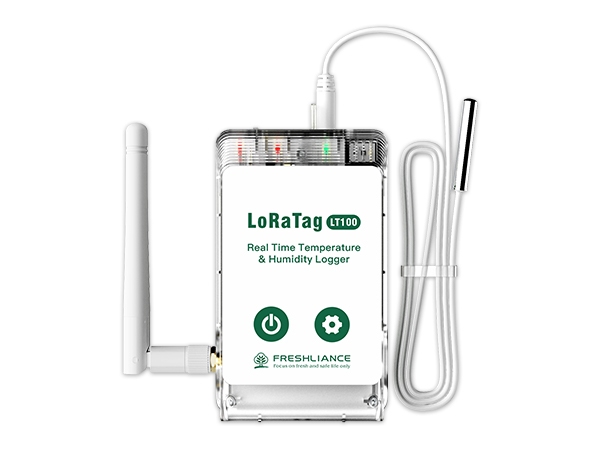
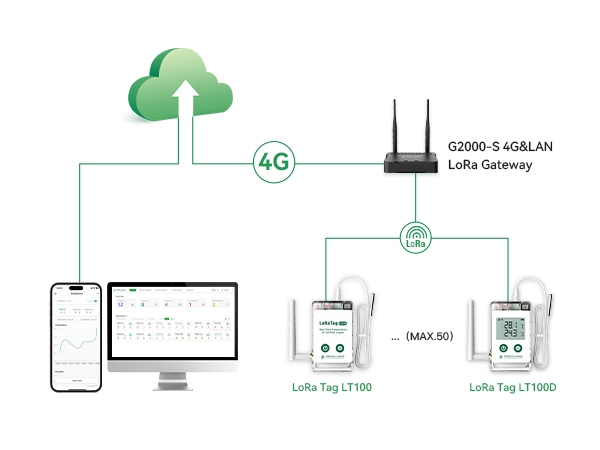
A LoRa wireless architecture enables distributed environmental monitoring without requiring a dedicated wired connection at every sensing point. The Freshliance LoRa Tag LT100 Temperature and Humidity Logger can be installed at defined locations throughout galleries, collection storage areas, laboratories, preparation rooms, and other museum spaces. Each LT100 collects temperature and relative humidity data and transmits the readings via LoRa to a GAEA Series LoRa gateway, such as the G2000. A single gateway can centrally manage up to 50 LT100 loggers, supporting scalable multi-point monitoring across large or complex facilities.
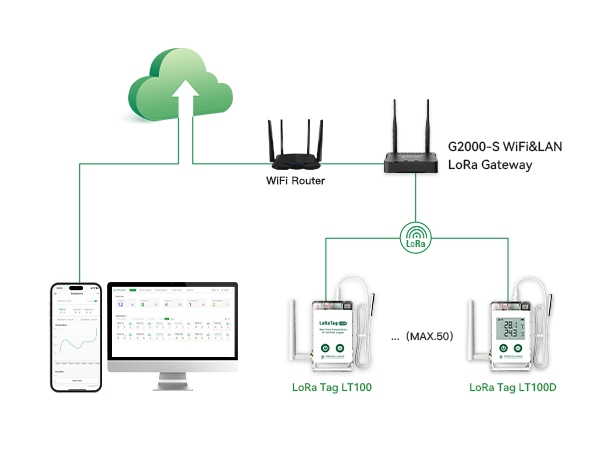
The gateway receives data from the LT100 loggers and uploads it to the Freshliance Cloud through 4G, WiFi, or LAN. Authorized users can then review real-time and historical data through the mobile app or cloud platform and receive SMS, email, or app notifications when preset temperature or humidity limits are exceeded.
The LT100 LoRa Temperature Humidity Logger provides a built-in temperature measurement range of -30°C to +70°C and a relative humidity range of 0–100% RH. An optional external probe supports measurements at a separate location or extends the applicable temperature range, depending on the selected probe. If the network connection is temporarily interrupted, the logger can store up to 100,000 readings locally and automatically synchronize the cached data to the cloud after communication is restored.
Remote Alerts for Faster Environmental Response
Remote monitoring becomes more effective when alarm events are linked to defined response procedures. The LT100 LoRa Temperature Humidity Logger supports up to six configurable alarm points, with notifications delivered through mobile app push, SMS, or email. Staff can receive notifications when configured temperature or RH thresholds are exceeded, then determine whether the event requires on-site verification, review of HVAC operating conditions, equipment assessment, or documented corrective action.
Indoor wireless coverage can be affected by thick walls, metal structures, display cabinets, and room layout. A robust deployment combines alarm configuration with wireless coverage verification, standardized device identification, and clearly assigned escalation responsibilities.
Freshliance Solutions for Museum and Exhibition Monitoring
LoRa Tag LT100 for Distributed Facility Coverage
TagPlus-TH for Temporary or Portable Monitoring
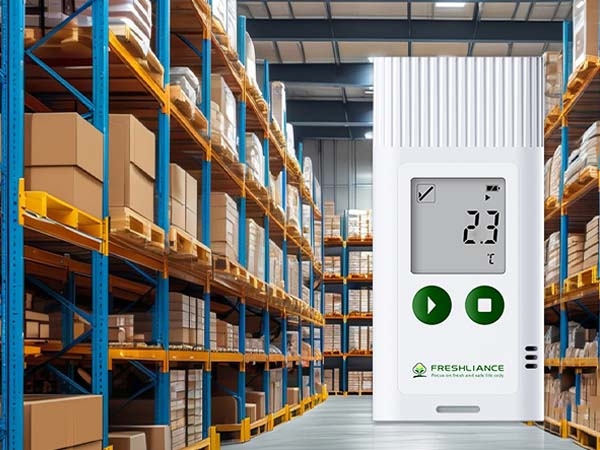
Temporary monitoring requirements do not always require a permanent IoT infrastructure. For temporary exhibitions, gallery renovation projects, object movement, or short environmental surveys, a standalone data logger may be appropriate when portable, local data collection meets the monitoring and documentation requirements. Freshliance TagPlus-TH Temperature Humidity Data Logger is a multi-use temperature and humidity data logger with an LCD screen and PDF/CSV reporting.
TagPlus-TH Temperature Humidity Data Logger records -30°C to +70°C temperature, with an optional -40°C to +60°C range, and 0% to 100% RH humidity. It supports up to 35,000 readings, 1-minute to 24-hour intervals, 6 alarm points, and 9 event marks, making it suitable for localized environmental surveys and temporary monitoring deployments.
Data Retrieval and Reporting for Museum Environmental Monitoring
For TagPlus-TH Temperature Humidity Data Logger, Freshliance Tools supports device configuration, data retrieval, trend visualization, statistical analysis, and PDF/CSV/TXT report export. For LT100-based IoT deployments, FreshLink and the associated cloud platform support device status, real-time and historical data, alarms, grouping, filtering, analysis, and data export.
Technical Factors to Consider Before Deployment
Sensor Placement and Wireless Coverage
Start by defining the monitoring objective and required monitoring points rather than selecting devices based solely on device count. Identify representative monitoring locations such as gallery entrances, display-case zones, storage racks, preparation areas, and object transition spaces. Then review sensor height, airflow, equipment, access, and gateway distance.
Room Conditions and Localized Microclimates
Display cases, enclosed cabinets, wall-adjacent storage areas, and densely packed shelving can create localized microclimates that differ from general room conditions. Where collection risk or conservation requirements justify closer observation, monitoring points should be selected to capture these localized environmental conditions.
Alarm Settings, Local Storage, and Reporting
Alarm thresholds should come from the museum's own collection requirements and operating procedures, not from a generic number copied between rooms. The response plan should state who receives the alert, who checks the room, how the event is recorded, and when the issue is closed. Local memory is also important because a temporary network interruption should not erase the environmental history.
Reporting needs should be defined at the same time. A connected platform is useful for current status and alarms, while downloadable PDF or CSV records can support project reviews, exhibition documentation, and comparisons between rooms. Combining live visibility with retained records makes the monitoring program useful during both daily operations and later investigation.
Building a Practical Museum Monitoring Plan
Separate Exhibition, Storage, and Transit Requirements
Exhibition halls, storage rooms, and object-transit areas do not have the same monitoring pattern. Galleries may need attention to visitors, doors, lighting, and display equipment. Storage rooms may need broader spatial coverage around racks or cabinets. Transit and temporary holding areas may need portable records that move with the object or installation.
A practical plan can therefore combine LT100 for fixed multi-point visibility with TagPlus-TH Temperature Humidity Data Logger for local surveys or temporary installations. This approach allows each device to be selected according to its intended monitoring function and deployment requirements instead of expecting one logger to provide permanent alarms, portable reporting, and every type of environmental evidence at the same time.
Combine IoT Data with Human Review
IoT temperature and humidity monitoring is most effective when data ownership, alarm responsibilities, and response procedures are clearly defined. Assign room names, device IDs, alert recipients, and retention rules. When an event occurs, correlate environmental trends with room access, HVAC operating status, exhibition installation activities, and other relevant events.
Conclusion
IoT temperature and humidity monitoring provides museums with continuous, location-specific environmental data that can be correlated with individual rooms, display areas, storage zones, and collection workflows. Freshliance LoRa Tag LT100 LoRa Temperature Humidity Logger can support distributed monitoring with gateway and cloud visibility, while TagPlus-TH Temperature Humidity Data Logger can provide portable local records for temporary exhibitions and focused surveys.
Begin with a clearly defined monitoring objective, representative monitoring points, realistic wireless coverage planning, appropriate alarm thresholds, and documented response procedures. Explore the Freshliance options above to match the sensor, connection method, and reporting workflow to your space.
FAQ
Q: Why is IoT temperature and humidity monitoring useful in museums?
A: It provides time-based, location-specific records across exhibition halls, storage rooms, laboratories, and other collection spaces. Compared with occasional manual readings, connected monitoring can reveal short fluctuations, support remote alerts, and help teams compare conditions between zones. Conservation staff still define the appropriate response for each collection.
Q: Can LoRa Tag LT100 monitor multiple exhibition rooms?
A: LT100 LoRa Temperature Humidity Logger is designed as a LoRa temperature and humidity endpoint for distributed facility monitoring. Multiple devices can work through GAEA Series gateways, but practical coverage depends on walls, cabinets, metal structures, gateway placement, and the building layout. A pilot test should confirm the indoor signal path before wider installation.
Q: When should a museum use TagPlus-TH instead of an IoT sensor?
A: TagPlus-TH Temperature Humidity Data Logger is useful when the monitoring task is temporary, portable, or focused on local report collection rather than continuous cloud visibility. It can support temporary exhibitions, object movement, short surveys, and recurring checks where staff can retrieve the device through USB and redeploy it after reviewing the recorded temperature and humidity data.
Previous: Bluetooth Data Logger for Cold Chain Temperature Monitoring
Next: No