Protect Stored Products with Smart Temperature Monitoring
Effective warehouse temperature and humidity monitoring requires more than occasional manual readings. Storage teams need representative monitoring points, suitable logging intervals, clearly defined alarm thresholds, and reliable historical records to understand what happens between inspections. A temperature and humidity data logger can continuously record environmental conditions, helping warehouse teams identify excursions, analyze trends, compare conditions across monitoring periods, and maintain documented records for temperature- or humidity-sensitive inventory.
At Freshliance, we develop and manufacture temperature and humidity data loggers and environmental monitoring solutions for cold chain transportation and storage, life science, pharmaceutical, food, and other temperature-sensitive applications. Our product portfolio includes standalone data loggers, mobile software, cloud, and IoT monitoring solutions for local data collection and remote environmental monitoring.
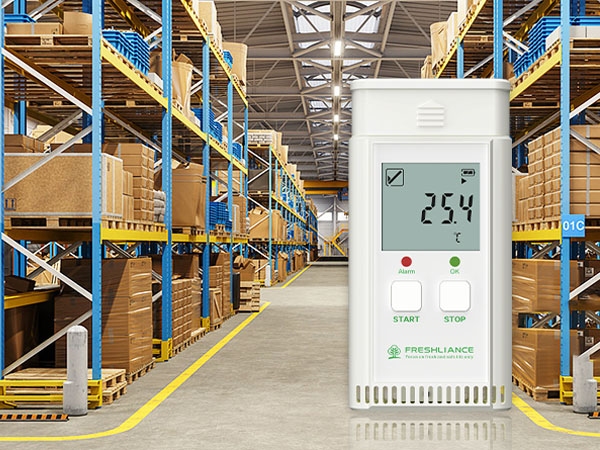
What Is Warehouse Temperature and Humidity Monitoring?
Warehouse temperature and humidity monitoring is the systematic measurement, recording, review, and documentation of environmental conditions within a storage facility. A monitoring program typically combines temperature and relative humidity sensors or data loggers, defined monitoring locations, appropriate logging intervals, alarm limits, data review procedures, and documented responses to excursions.
Why Temperature and Humidity Change Across a Warehouse
Warehouse environmental conditions are rarely spatially uniform. Loading doors, exterior walls, ventilation outlets, refrigeration equipment, storage density, and rack height can all influence local conditions. A single measurement point may not represent the environmental conditions throughout the warehouse. Temperature and humidity can vary by location and height because of door openings, HVAC airflow, refrigeration equipment, building envelope effects, rack configuration, and product loading patterns.
High relative humidity or repeated humidity excursions may increase the risk of condensation, corrosion, packaging degradation, or quality deterioration for humidity-sensitive products and materials. For this reason, warehouse environmental monitoring often needs to evaluate temperature and relative humidity together rather than relying on temperature alone.
Why Continuous Warehouse Temperature and Humidity Monitoring Matters
Manual inspections only show conditions at the moment a measurement is taken. For example, normal readings at the beginning and end of a shift do not prove that conditions remained stable during the hours between those checks.
Continuous temperature monitoring creates a time-based history that makes short excursions and repeated patterns easier to identify. Maximum, minimum, average, alarm and trend information can help operators investigate whether changes are associated with loading activity, refrigeration cycles, HVAC operation, seasonal conditions, or specific storage zones.
Historical records are also useful when warehouse teams need to review how products were stored instead of relying only on current readings.
Where Should Temperature and Humidity Data Loggers Be Placed?
Permanent monitoring locations should be determined based on the warehouse layout, product storage conditions, environmental risk assessment, and, where applicable, temperature mapping or qualification results. Monitoring density should be determined by facility layout, environmental variability, product risk, and monitoring objectives. Monitoring points should represent meaningful environmental differences within the facility.
For long-term monitoring, maintaining fixed monitoring locations can improve data consistency and make results easier to compare across monitoring periods. When a logger remains in a defined location, measurements from different weeks or months are easier to compare. Freshliance Atlas Pro-TH USB Bluetooth Temperature and Humidity Data Logger offers an optional wall bracket for installation on walls or other fixed surfaces, making it suitable for routine warehouse checks and long-term deployment.
How to Choose a Warehouse Temperature and Humidity Data Logger
Selecting a warehouse temperature and humidity data logger should begin with the storage requirements, environmental conditions, monitoring objectives, and applicable quality requirements.
Match the Measurement Range to the Application
The selected logger should cover both normal storage conditions and reasonably expected excursions. The Atlas Pro-TH USB Bluetooth Temperature and Humidity Data Logger measures temperature from -40°C to +85°C and relative humidity from 0 to 100% RH. Its specified temperature accuracy is ±0.3°C F.S., while humidity accuracy is ±3% RH at 25°C and 20–80% RH, and ±5% RH under other conditions.
These specifications support long-term environmental monitoring in applications such as cold chain storage, vaccines, biological samples, electronics, and fruits and vegetables, provided that the required storage conditions fall within the device's specified measurement range and accuracy requirements.
Consider Logging Interval and Memory Together
The Atlas Pro-TH USB Bluetooth Temperature and Humidity Data Logger provides a configurable logging interval from 1 minute to 24 hours. The device can store up to 35,000 readings when configured for PDF reporting, or up to 20,000 readings for CSV and combined PDF/CSV reporting.
The correct interval should therefore be selected according to product sensitivity, expected rate of environmental change, storage duration and internal monitoring procedures rather than simply choosing the shortest available interval.
Consider Battery Life for Fixed Long-Term Monitoring Locations
Long-term storage monitoring can become inefficient if devices require frequent battery replacement or repeated maintenance. This is especially relevant when several loggers are installed throughout one warehouse.
The Atlas Pro-TH USB Bluetooth Temperature and Humidity Data Logger is designed for multi-use monitoring and provides up to five years of battery life with its built-in ER14335 battery, supporting long-term deployment while reducing the need for frequent battery replacement.
Understand the Difference Between USB and Bluetooth Access
USB and Bluetooth solve different workflow problems.
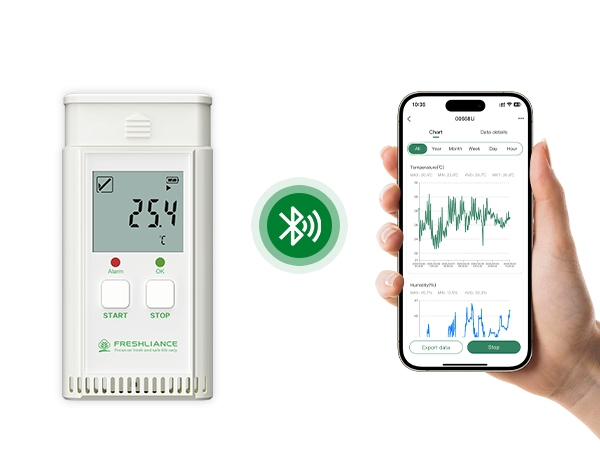
With USB access, users can connect the Atlas Pro-TH USB Bluetooth Temperature and Humidity Data Logger to a computer for parameter configuration and report generation. The device supports PDF, CSV, and combined PDF/CSV reports, which can be useful for archiving and quality documentation.
Bluetooth provides nearby wireless access through the Tkeeper mobile application. Users can review recorded data, adjust settings, examine graphs and trends, and analyze values such as maximum, minimum and average readings without connecting the device directly to a PC.
How to Turn Storage Monitoring Data Into Useful Records
The value of environmental monitoring depends on systematic data review, excursion assessment, and documented corrective actions.
Alarm and warning limits should be established based on the product's labeled storage conditions, applicable specifications, risk assessment, and site SOPs. Alarm and warning limits should be configured in accordance with the site's documented response procedures and the risk of exceeding the specified storage conditions. The Atlas Pro-TH USB Bluetooth Temperature and Humidity Data Logger supports up to six alarm points and nine event marks, allowing operators to identify important events within a monitoring period.
The device also includes an LCD screen and LED indicators. The LCD can display current readings, maximum, minimum and average values, recording status, alarm status and event marks, allowing personnel to perform quick on-site checks without first exporting the recorded data.
For deeper review, the Tkeeper application provides graphs and data analysis. Instead of evaluating a single out-of-range reading in isolation, teams can examine whether temperature or humidity excursions recur at particular times, locations, or operating conditions. PDF and CSV exports can be archived as part of storage records, quality documentation, or audit preparation, subject to the site's record-retention and data-integrity procedures.
Using Atlas Pro-TH for Long-Term Storage Monitoring
For warehouses that require long-term local data logging rather than independent real-time Wi-Fi or cellular connectivity at every monitoring point, the Atlas Pro-TH USB Bluetooth Temperature and Humidity Data Logger provides a practical combination of long operating life, local visibility and flexible data retrieval.
Its battery life of up to five years supports long-term fixed monitoring deployments, while the optional wall bracket makes consistent placement easier. USB access supports PC-based configuration and report management, while Bluetooth enables convenient nearby checks through a mobile device. The combination reduces dependence on a single data-access method.
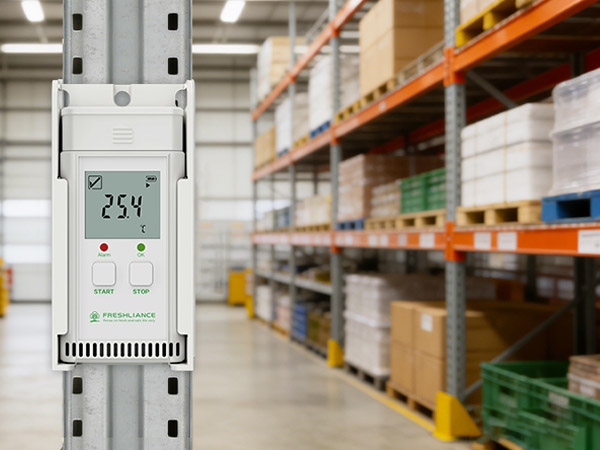
The Atlas Pro-TH USB Bluetooth Temperature and Humidity Data Logger also records temperature and humidity in one device and provides configurable intervals, alarm points, LCD information, trend analysis and exportable records. These functions support long-term storage monitoring where historical environmental records and local data access are required.
At Freshliance, our broader approach extends beyond an individual logger. We combine environmental monitoring hardware with software, cloud and IoT technologies so that customers can select an architecture appropriate to the size of the facility and the level of remote visibility required.
Conclusion
Reliable warehouse temperature and humidity monitoring depends on suitable device placement, appropriate logging intervals, meaningful alarm limits and consistent data review. A temperature and humidity data logger for long-term storage should support these requirements while minimizing unnecessary maintenance.
Contact Freshliance to discuss the right temperature and humidity monitoring solution for your warehouse or long-term storage application.
FAQ
Q: How do you monitor temperature and humidity in a warehouse?
A: Start by identifying storage zones where environmental conditions may differ, such as doors, perimeter walls, racks and HVAC areas. Place temperature and humidity data loggers at representative locations, define suitable recording intervals and alarm limits, and regularly review historical trends instead of relying only on occasional manual readings.
Q: Is USB or Bluetooth better for warehouse temperature monitoring?
A: They serve different purposes. USB is useful for PC-based configuration, report export and data archiving, while Bluetooth allows nearby wireless access through a mobile application. The Atlas Pro-TH USB Bluetooth Temperature and Humidity Data Logger supports both, allowing warehouse personnel to select the most convenient method for routine inspections and documentation.
Q: What is the ideal temperature and humidity for a warehouse?
A: There is no single ideal temperature and humidity range for every warehouse. Appropriate conditions depend on the products being stored, their specified storage requirements, packaging, facility design, and applicable quality procedures. Warehouse teams should establish temperature and relative humidity limits according to product requirements and monitor conditions continuously where environmental stability is important.
Previous: Cold Storage Temperature Monitoring: Reduce Spoilage Risk
Next: Real-Time Environmental Monitoring: IoT & BMS Integration