LoRa Temperature Monitoring for Smarter Cold Storage
LoRa temperature monitoring provides continuous environmental monitoring for large warehouses and cold storage facilities, covering racks, aisles, and critical storage zones. These distributed sensors send data to a central gateway. This gives staff a much clearer view of the facility compared to simple manual checks or using just one logger at the main door.
The best results come from using a multi-point setup. You should track specific zones that show different conditions and configure appropriate temperature and humidity alarm thresholds, so alerts reach the right people quickly. Freshliance helps with this through the LoRa Tag LT100 LoRa Temperature Humidity Logger. It is a wireless temperature and humidity logger designed for centralized temperature and humidity monitoring in large-scale facilities.

Why LoRa Temperature Monitoring Fits Large Warehouses
Coverage for Distributed Storage Areas
Large warehouses often experience temperature variations across different zones due to airflow patterns, door openings, storage density, and cooling system performance. Loading docks let in outside air, and doors open and close constantly. High shelves might stay warmer than the ground floor, while airflow shifts as stock moves in and out.
Using LoRa temperature monitoring allows teams to track these changes without requiring extensive wired infrastructure. The LT100 LoRa Temperature Humidity Logger provides wireless transmission distances of up to 400 meters under open-field conditions. Actual indoor coverage depends on warehouse structure, metal racks, walls, and gateway placement. This supports a wide layout if you plan your gateway spots based on the actual facility layout and RF conditions.
A Gateway-Based Data Path
Reliable data transmission is essential for effective warehouse environmental monitoring. In a Freshliance LoRa system, LT100 loggers send local data to a matching GAEA Series G2000 4G/WiFi/LAN LoRa Gateway. This gateway uploads collected data to a cloud-based monitoring through an Ethernet, WiFi, or cellular internet connection.
This setup makes it very simple to access real-time measurements and historical environmental data through a centralized dashboard. This lets a warehouse team add more checkpoints without treating every single device as a separate project.
Designing Multi-Point Warehouse Monitoring
Place Sensors Where Conditions Can Diverge
A good plan identifies areas with different risks instead of just spacing sensors out to look neat. Recommended monitoring locations include staging areas near docks, racks by the doors, and low-airflow areas or locations with limited air circulation. You should also watch high and low shelves, freezer entrances, and spots near cooling fans.
The goal is to understand actual temperature distribution and environmental changes within the facility. It is not just about having a high number of devices. Teams must also check if metal racks, thick walls, or heavy stock block radio signals before they fix the final sensor positions.
Choose the Right Measurement Point
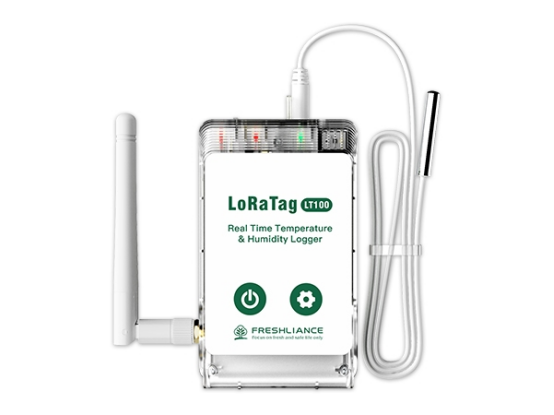
The LT100 LoRa Temperature Humidity Logger comes with a built-in sensor that tracks -30°C to +70°C with ±0.5°C accuracy. It also tracks humidity from 0-100%RH. It stays within ±3%RH at 25°C and ±5%RH under other conditions.
Sometimes the air temperature is not enough. For these cases, the device supports an optional external probe. This external probe supports measurements from -90°C to +200°C, making it suitable for ultra-low-temperature freezers, laboratory equipment, and specialized industrial applications.
Using the Freshliance LoRa Tag LT100
Hardware Details That Support Deployment
The LoRa Tag LT100 Temperature Humidity Logger uses LoRa technology and works on 433 MHz, 868 MHz, or 915 MHz bands. It features a 4000 mAh rechargeable battery that lasts up to a year when sending data every five minutes.
Alerts and Local Data Protection
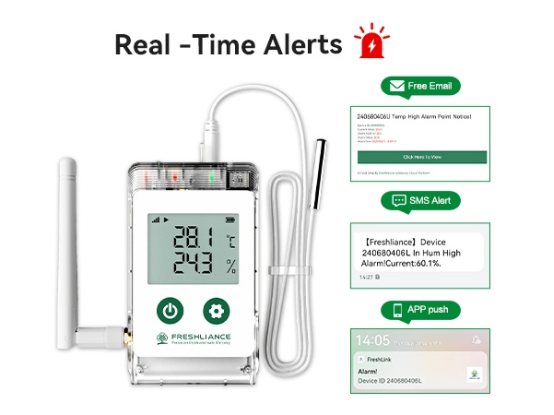
A monitoring system must have clear limits, especially in cold storage environments where temperature compliance and product safety are critical. The LT100 LoRa Temperature Humidity Logger allows for six alarm points. The system sends alerts via app push, SMS, or email so staff can respond quickly and take corrective actions.
The logger also saves up to 100,000 readings on its internal memory. The device automatically initiates localized offline logging the moment a network connection fails. Once wireless stability is restored, all cached data automatically synchronizes back to the cloud, guaranteeing an uncompromised audit trail for GxP and FDA inspections.
Applying LoRa Monitoring Across Cold Storage Operations
Cold Rooms and Warehouse Zones
Monitoring is more effective when it follows the actual workflow of the site. A cold room might need one sensor near the cooling unit, one near the entrance, one near the cooling unit, and one in the rear storage area. Each of these spots often shows a different thermal pattern.
Warehouse tracking works the same way on a larger scale. A multi-point setup helps teams compare areas for receiving, long-term storage, and shipping. If a reading looks strange, they can quickly see if it is caused by airflow, door use, or equipment issues.
Laboratories and Controlled Storage
This LoRa setup also works well for laboratory refrigerators and controlled-temperature storage units. Central data access means staff do not have to walk to every fridge to check a screen. They can see all current levels and past trends from their desk.
Freshliance also offers API options to connect with other software. For companies using their own management platforms, this helps environmental data flow directly into their existing daily work reports.

Making the System Useful Every Day
Set Limits That Match the Storage Requirement
Alarm settings should match the specific needs of the goods being stored. A staging area and a lab cabinet should not use the same generic limits. Each zone needs its own thresholds and a clear plan for who to contact when things go wrong.
Checking the history of these alarms is also important. Small, frequent spikes can point to bigger problems that a single event might hide. Over time, these trends help teams improve how they place sensors and maintain their cooling gear.
Plan Scale and Connectivity Before Installation
Before you start, check the building layout and the signal strength inside. You need to know the path from the gateway to the cloud and how many sensors you need. The 400-meter range is for open air, so always test how walls and racks affect the signal on-site.
For sites that need different types of hardware, Freshliance provides various wireless temperature and humidity monitoring options. The best choice is the one that fits your range needs, alert style, and the actual physical shape of your warehouse.
Conclusion
LoRa temperature monitoring offers a scalable way for large warehouses to track conditions in critical zones. By using multi-point sensors, central gateways, and smart alarms, Freshliance helps companies move away from manual logs. This creates a much more accurate and reliable picture of the storage environment every day.
To learn more about a Freshliance LoRa monitoring setup for your site, reach out to the Freshliance contact team.
FAQ
Q: What is LoRa temperature monitoring?
A: It is a system that uses long-range wireless signals to send data from sensors to a central gateway. This gateway puts the data online so teams can monitor temperature and humidity from anywhere without visiting each sensor.
Q: How often should warehouse temperature sensors record data?
A: Recording intervals depend on storage requirements, product sensitivity, and compliance standards. Many cold chain applications use intervals from one to five minutes.
Q: What is the difference between LoRa and WiFi temperature monitoring?
A: LoRa sensors are designed for long-distance, low-power industrial monitoring, while WiFi solutions are generally better suited for smaller areas with existing wireless coverage.
Previous: How to Build a Real-Time Laboratory Monitoring System
Next: USB vs Bluetooth vs WiFi vs 4G Data Logger: Which Is Best